综述
Cocos2dx API风格
一、对象构造
两阶段构造器
由于C++的构造器本身并不返回能够用作逻辑判断的bool值,所以语言级别的构造和逻辑级别的构造(逻辑层面的初始化)需要分开,也就有了官方文档中说明的两阶段构造器:
- 第一阶段是运行C++类构造器。在C++类的默认构造器中,成员变量须设定为默认值。但我们不应在默认构造器中编写任何逻辑。
- 第二阶段是调用MyClass::init()函数
例如:
MyClass::MyClass()  // c++ class constructor
:_data(NULL)      // set all member variables to default values
,_flag(false)
,_count(0)
{
    memset(_array, 0, sizeof(_array));   // only set default values here, but not logics
}

bool MyClass::initWithFilename(const std::string& filename)
{
    // just take loading texture as a sample, this behaviour can fail if the image file doesn't  exist.
    bool bReturnValue = loadTextureIntoMemory(filename);
    return bReturnValue;
}
静态create()函数
在Cocos2d-x引擎中,我们已对这一两阶段构造器进行包装,并在静态函数create()中自动释放引用计数。除了单例模式,每一个cocos2d类都有自己的static CCClass* CCClass::create(…)方法。极力推荐这一方法。即create包含:
- 两阶段构造器
- 调用autorelease()自动释放引用计数
例如:
Layout* Layout::create()
{
    Layout* layout = new (std::nothrow) Layout();
    if (layout && layout->init())
    {
        layout->autorelease();
        return layout;
    }
    CC_SAFE_DELETE(layout);
    return nullptr;
}
by the way,自动释放引用计数有点类似Android中的智能指针,Object-C中的内存管理机制,简单来说就是通过Ref,PoolManager,AutoreleasePool搭建的一套基于引用计数的半自动的内存管理机制。代码节选如下:
Ref* Ref::autorelease()
{
    PoolManager::getInstance()->getCurrentPool()->addObject(this);
    return this;
}

class CC_DLL PoolManager
{
public:

    CC_DEPRECATED_ATTRIBUTE static PoolManager* sharedPoolManager() { return getInstance(); }
    static PoolManager* getInstance();

    CC_DEPRECATED_ATTRIBUTE static void purgePoolManager() { destroyInstance(); }
    static void destroyInstance();

    /**
     * Get current auto release pool, there is at least one auto release pool that created by engine.
     * You can create your own auto release pool at demand, which will be put into auto releae pool stack.
     */
    AutoreleasePool *getCurrentPool() const;

    bool isObjectInPools(Ref* obj) const;


    friend class AutoreleasePool;

private:
    PoolManager();
    ~PoolManager();

    void push(AutoreleasePool *pool);
    void pop();

    static PoolManager* s_singleInstance;

    std::vector<AutoreleasePool*> _releasePoolStack;
};

class CC_DLL AutoreleasePool
{
public:
    /**
     * @warning Don't create an autorelease pool in heap, create it in stack.
     * @js NA
     * @lua NA
     */
    AutoreleasePool();

    /**
     * Create an autorelease pool with specific name. This name is useful for debugging.
     * @warning Don't create an autorelease pool in heap, create it in stack.
     * @js NA
     * @lua NA
     *
     * @param name The name of created autorelease pool.
     */
    AutoreleasePool(const std::string &name);

    /**
     * @js NA
     * @lua NA
     */
    ~AutoreleasePool();

    /**
     * Add a given object to this autorelease pool.
     *
     * The same object may be added several times to an autorelease pool. When the
     * pool is destructed, the object's `Ref::release()` method will be called
     * the same times as it was added.
     *
     * @param object    The object to be added into the autorelease pool.
     * @js NA
     * @lua NA
     */
    void addObject(Ref *object);

    /**
     * Clear the autorelease pool.
     *
     * It will invoke each element's `release()` function.
     *
     * @js NA
     * @lua NA
     */
    void clear();

#if defined(COCOS2D_DEBUG) && (COCOS2D_DEBUG > 0)
    /**
     * Whether the autorelease pool is doing `clear` operation.
     *
     * @return True if autorelase pool is clearning, false if not.
     *
     * @js NA
     * @lua NA
     */
    bool isClearing() const { return _isClearing; };
#endif

    /**
     * Checks whether the autorelease pool contains the specified object.
     *
     * @param object The object to be checked.
     * @return True if the autorelease pool contains the object, false if not
     * @js NA
     * @lua NA
     */
    bool contains(Ref* object) const;

    /**
     * Dump the objects that are put into the autorelease pool. It is used for debugging.
     *
     * The result will look like:
     * Object pointer address     object id     reference count
     *
     * @js NA
     * @lua NA
     */
    void dump();

private:
    /**
     * The underlying array of object managed by the pool.
     *
     * Although Array retains the object once when an object is added, proper
     * Ref::release() is called outside the array to make sure that the pool
     * does not affect the managed object's reference count. So an object can
     * be destructed properly by calling Ref::release() even if the object
     * is in the pool.
     */
    std::vector<Ref*> _managedObjectArray;
    std::string _name;

#if defined(COCOS2D_DEBUG) && (COCOS2D_DEBUG > 0)
    /**
     *  The flag for checking whether the pool is doing `clear` operation.
     */
    bool _isClearing;
#endif
};
二、函数命名
doSomething()
没啥好说的,主流的函数命名方式,动词 + 名词的方式命名一个函数。表明干什么。如:getTexture()
doWithResource()
表明通过什么(借助什么、用什么)干什么。如:initWithTexture(CCTexture*)
onEventCallback()
on开头表示是一个回调函数。如:void onEnter()
getInstance()
单例模式,没啥特别的。在v3.0之前,单例类的构造方式是CocosClass::sharedCocosClass(),比如TextureCache::sharedTextureCache()。顺带一提,shared是Object-C中的单例代码风格。
三、属性
因为在C++ 和 C++11中没有”property” (“属性”)这个概念,所以我们在Cocos2d-x引擎中使用了许多getter和setters。因为Object-C中有“属性”这个概念(貌似C#等语言中也有“属性”的这个概念),此处就通过类似Java Bean/VO的实现方式增加getter 和 setter:
- setProperty() 如setPosition()
- getProperty() 如果获取的属性并非bool类型的话,用get,否则用is。如getVisibleSize()
- isProperty() 如:isDirty()
Cocos2dx架构和目录结构
Cocos2dx架构
如图:
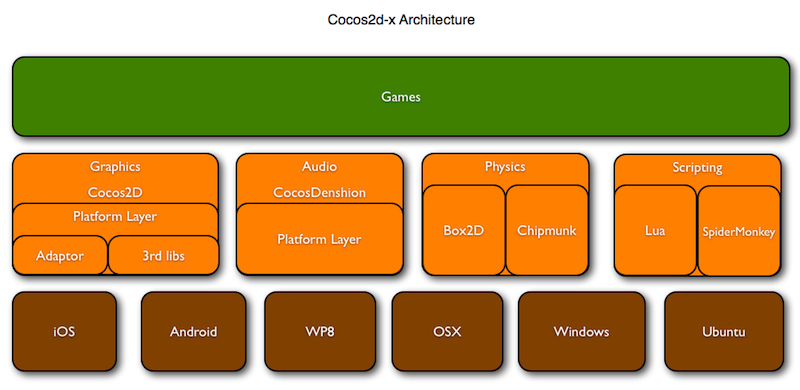
暂未研究过其代码架构,但从图示上看,目前Cocos2dx主要在各个平台的基础上抽象了,视图,音频,物理引擎,脚本四大部分的功能。
Cocos2dx目录结构
官方文档给出的目录结构如下(但就目测而言,3.6版本与之几乎完全不一样):
- CocosDenshion 音频支持。注意:Android平台中背景音乐和短音效所使用的系统API不同。
- cocos2dx Cocos2d-x框架的主目录。
- document 你可以下载doxygen文档系统,利用该系统打开本文档文件夹内的doxygen.config文件,然后再生成离线API文档。
- extensions 如果需要更多图形用户界面的控制功能、网络访问、CocosBuilder支持甚至2.5D功能,你可以使用using namespace cocos2d::extension。
- external 包括box2d及Chipmunk库。
- licenses cocos2d依赖很多其他开源项目。所有授权许可文件都在这个目录。
- samples 重要!这是你该开始用到的文件。从Cpp/HelloCpp开始学习,你会在TestCpp中发现所有类的用法。lua和js样本也在这个目录。
- scripting 我知道你不喜欢C++,写起来太复杂。没问题,我们有Lua和Javascript。Scripting文件夹包括来自火狐的lua官方引擎和SpiderMonkey引擎。
- template 该目录包括在不同集成开发环境及不同平台中创建Cocos2d-x新项目的模板。这里汇集了数量庞大覆盖各种开发环境和平台的模板!
- tools 包括将C++绑定至lua及javascript的脚本文件。
- CHANGELOG 作者修订记录文档。
- cocos2d-win32.vc2010.sln 配套Visual Studio 2010打开。注意:VS 2008自Cocos2d-x v2.0版本以来就不再支持。
- cocos2d-win32.vc2012.sln 配套Visual Studio 2012打开。
- create-android-project.bat 在Windows平台运行。具体用法请参考如何用脚本创建Android项目。
- create-android-project.sh 在Linux或OS X平台运行。具体用法请参考如何用脚本创建Android项目。
- install-templates-msvc.bat 执行该文件安装后,你可以在Visual Studio中创建空的Cocos2d-x项目。
- install-templates-xcode.sh 执行该文件安装后,你可以在Xcode中创建空的Cocos2d-x项目。
总而言之,包括了cocos2dx引擎的核心框架目录,用到的第三方开源项目/引擎/库的目录,样例目录,母版目录,工具目录,控制台命令相关工具目录,证书目录等等。
基础概念
导演、场景、层、精灵
基础介绍
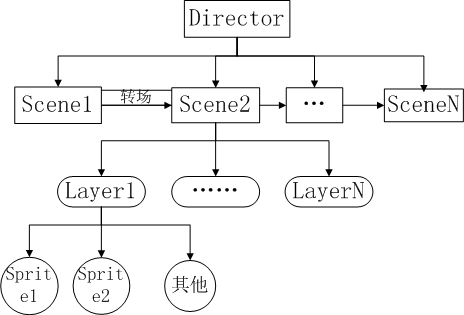
在Cocos2d-x-3.x引擎中,采用节点树形结构来管理游戏对象,一个游戏可以划分为不同的场景,一个场景又可以分为不同的层,一个层又可以拥有任意个可见的游戏节点(即对象,游戏中基本上所有的类都派生于节点类Node)。可以执行Action来修改游戏节点的属性,使其移动、旋转、放大、缩小等等。
每一个时刻都有一个场景在独立运行,通过切换不同的场景来完成一个游戏流程,游戏流程的管理由Director来执行,其基本框架类图如下:
导演(Director)
一款游戏好比一部电影,只是游戏具有更强的交互性,不过它们的基本原理是一致的。所以在Cocos2dx中把统筹游戏大局的类抽象为导演(Director),Director是整个cocos2dx引擎的核心,是整个游戏的导航仪,游戏中的一些常用操作就是由Director来控制的,比如OpenGL ES的初始化,场景的转换,游戏暂停继续的控制,世界坐标和GL坐标之间的切换,对节点(游戏元素)的控制等,还有一些游戏数据的保存调用,屏幕尺寸的获取等都要由Director类来管理控制的。
因为Director是游戏项目的总导演,会经常调用进行一些控制,所以该Director利用了单件设计模式,也就是项目里取到的director都是同一个。用getInstance() 方法取得Director的实例,具体的API可以参考相关文档,就不做赘述了。
场景(Scene)
Scene场景也是cocos2dx中必不可少的元素,游戏中通常我们需要构建不同的场景(至少一个),游戏里关卡、版块的切换也就是一个一个场景的切换,就像在电影中变换舞台和场地一样。场景的一个重要的作用就是流程控制的作用,我们可以通过Director的一系列方法控制游戏中不同的场景的自由切换。
下面是Director控制场景的常用方法:
- runWithScene( Scene *scene ) 启动游戏,并运行scene场景。本方法在主程序第一次启动主场景的时候调用。如果已有正在运行的场景则不能调用该方法;会调用pushScene–>startAnimation。
- pushScene( Scene *scene ) 将当前运行中的场景暂停并压入到代码执行场景栈中,再将传入的scene设置为当前运行场景,只有存在正在运行的场景时才调用该方法;
- replaceScene( Scene *scene ) 直接使用传入的scene替换当前场景来切换画面,当前场景被释放。这是切换场景时最常用的方法。
- popScene() 释放当前场景,再从代码执行场景中弹出栈顶的场景,并将其设置为当前运行场景。如果栈为空,直接结束应用。和PushScene结对使用
- end() 释放和终止执行场景,同时退出应用
- pause() 暂停当前运行场景中的所有计时器和动作,场景仍然会显示在屏幕上
- resume () 恢复当前运行场景的所有计时器和动作,场景仍然会显示在屏幕上
同时场景是层的容器,包含了所有需要显示的游戏元素。通常,当我们需要完成一个场景时候,会创建一个Scene的子类,并在子类中实现我们需要的功能。比如,我们可以在子类的初始化中载入游戏资源,为场景添加层,启动音乐播放等等。
层(Layer)
Layer是处理玩家事件响应的Node子类。与场景不同,层通常包含的是直接在屏幕上呈现的内容,并且可以接受用户的输入事件,包括触摸,加速度计和键盘输入等。我们需要在层中加入精灵,文本标签或者其他游戏元素,并设置游戏元素的属性,比如位置,方向和大小;设置游戏元素的动作等。通常,层中的对象功能类似,耦合较紧,与层中游戏内容相关的逻辑代码也编写在层中,在组织好层后,只需要把层按照顺序添加到场景中就可以显示出来了。要向场景添加层,我们可以使用addChild方法。
addChild( Node child ) addChild( Node child, int zOrder ) addChild( Node *child, int zOrder, int tag )
其中,Child参数就是节点。对于场景而言,通常我们添加的节点就是层。先添加的层会被置于后添加的层之下。如果需要为它们指定先后次序,可以使用不同的zOrder值。tag是元素的标识号码,如果为子节点设置了tag值,就可以在它的父节点中利用tag值就可以找到它了。层可以包含任何Node作为子节点,包括Sprites(精灵), Labels(标签),甚至其他的Layer对象。
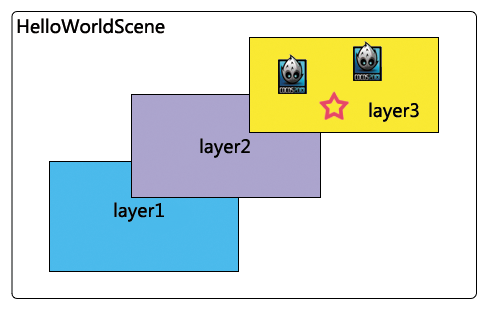 上图所示的图片中,叫做HelloWorldScene的场景中有三个不同层,在layer3层上又有上个不同的精灵。
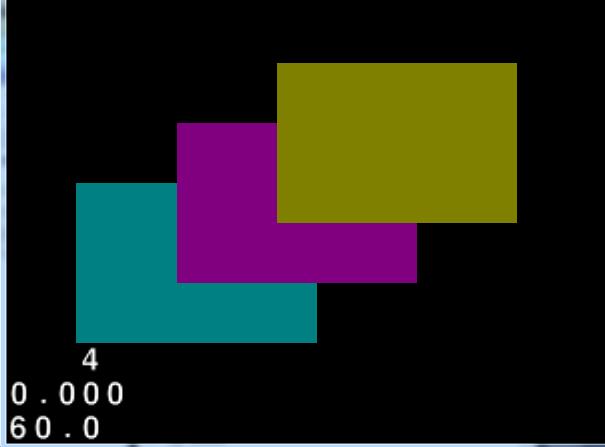
下面是一个创建三个不同层的例子:
auto layer = LayerColor::create(Color4B(0, 128, 128, 255));
layer->setContentSize(CCSizeMake(120, 80));
layer->setPosition(Point(50, 50));
addChild(layer, 10);
auto layer1 = LayerColor::create(Color4B(128, 0, 128, 255));
layer1->setContentSize(CCSizeMake(120, 80));
layer1->setPosition(Point(100, 80));
addChild(layer1, 20);
auto layer2 = LayerColor::create(Color4B(128, 128, 0, 255));
layer2->setContentSize(CCSizeMake(120, 80));
layer2->setPosition(Point(150, 110));
addChild(layer2, 30);
运行结果如图:
精灵(Sprite)
Cocos2d中的精灵和其他游戏引擎中的精灵相似,它可以移动,旋转,缩放,执行动画,并接受其他转换。Cocos2dx的Sprite由Texture,frame和animation组成,由opengles负责渲染。
简单过程可描述为:使用Texture2D加载图片,可以用Texture2D生成对应的SpriteFrame(精灵帧),将SpriteFrame添加到Animation生成动画数据,用Animation生成Animate(就是最终的动画动作),最后用Sprite执行这个动作。
创建精灵的几种方式:
直接创建:
auto sprite = Sprite::create("HelloWorld.png");
this->addChild(sprite,0);
使用纹理来创建精灵:
auto sprite1 = Sprite::createWithTexture(TextureCache::getInstance()->addImage("HelloWorld.png"));
this->addChild(sprite1, 0);
使用精灵帧来创建精灵:
auto sprite2=Sprite::createWithSpriteFrameName("HelloWorld.png");
this->addChild(sprite2, 0);
在Cocos2dx中实现精灵显示的基本过程如下:
//创建Scene
auto scene = Scene::create();
//创建层
auto layer = HelloWorld::create();
//把层加入场景中
scene->addChild(layer);
//创建一个精灵
auto sprite = Sprite::create("HelloWorld.png");
//把精灵加到层里
layer->addChild(sprite, 0);
调度器(scheduler)
继承关系
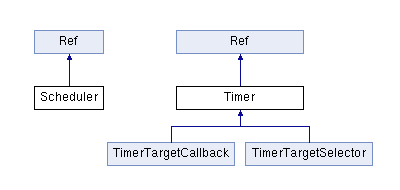
原理介绍
Cocos2d-x调度器为游戏提供定时事件和定时调用服务。所有Node对象都知道如何调度和取消调度事件,使用调度器有几个好处:
- 每当Node不再可见或已从场景中移除时,调度器会停止。
- Cocos2d-x暂停时,调度器也会停止。当Cocos2d-x重新开始时,调度器也会自动继续启动。
- Cocos2d-x封装了一个供各种不同平台使用的调度器,使用此调度器你不用关心和跟踪你所设定的定时对象的销毁和停止,以及崩溃的风险。
基础用法
默认调度器(schedulerUpdate)
该调度器是使用Node的刷新事件update方法,该方法在每帧绘制之前都会被调用一次。由于每帧之间时间间隔较短,所以每帧刷新一次已足够完成大部分游戏过程中需要的逻辑判断。
Cocos2d-x中Node默认是没有启用update事件的,因此你需要重载update方法来执行自己的逻辑代码。
通过执行schedulerUpdate()调度器每帧执行 update方法,如果需要停止这个调度器,可以使用unschedulerUpdate()方法。
自定义调度器(scheduler)
游戏开发中,在某些情况下我们可能不需要频繁的进行逻辑检测,这样可以提高游戏性能。所以Cocos2d-x还提供了自定义调度器,可以实现以一定的时间间隔连续调用某个函数。
由于引擎的调度机制,自定义时间间隔必须大于两帧的间隔,否则两帧内的多次调用会被合并成一次调用。所以自定义时间间隔应在0.1秒以上。
同样,取消该调度器可以用unschedule(SEL_SCHEDULE selector, float delay)。
单次调度器(schedulerOnce)
游戏中某些场合,你只想进行一次逻辑检测,Cocos2d-x同样提供了单次调度器。
该调度器只会触发一次,用unschedule(SEL_SCHEDULE selector, float delay)来取消该触发器。